AI Personal Finance Needs Management
June 2026 7 min read

Story Time
I had a pile of Amazon transactions sitting in my personal finance app categorized as Entertainment. Most of them, if not all, were not entertainment.
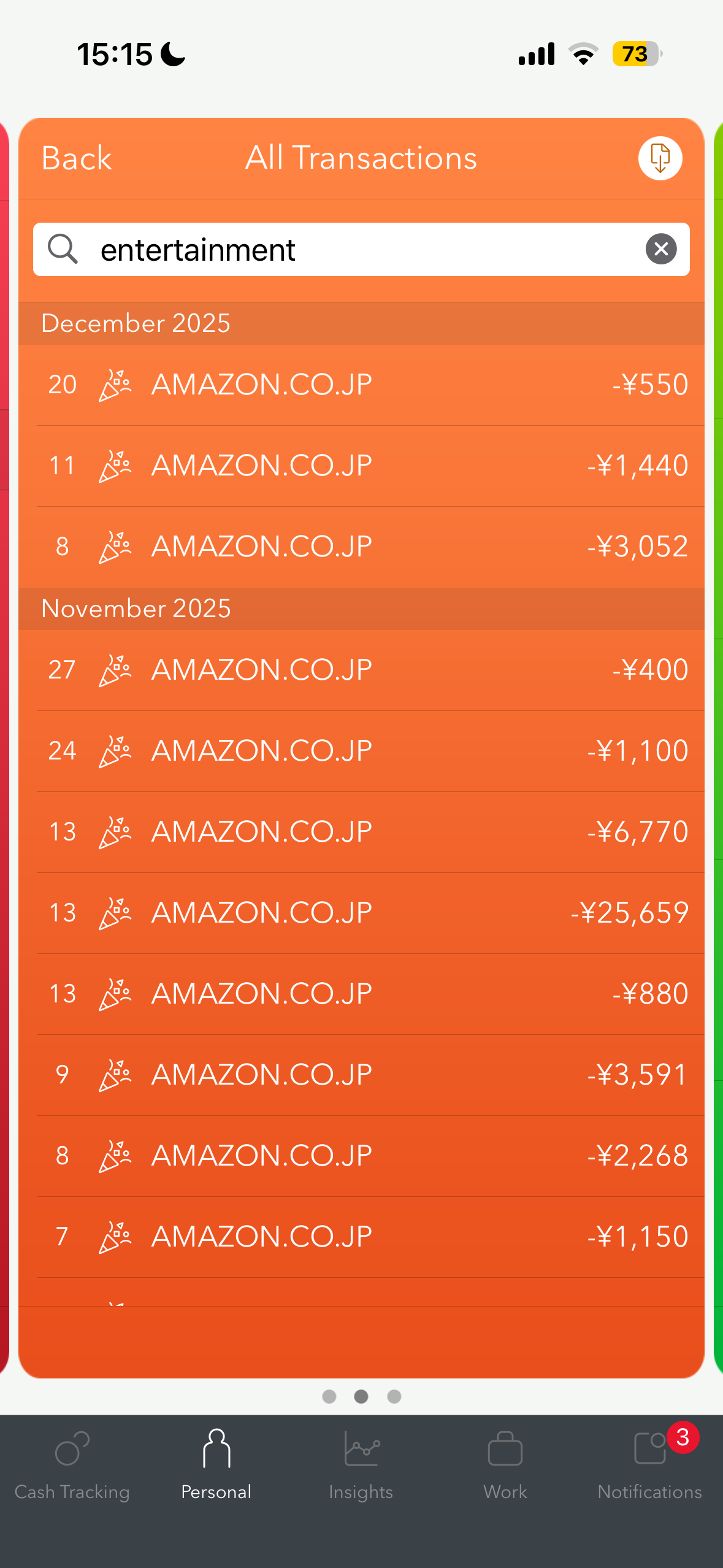
That is not a personal finance app problem. That is a financial data problem.
Credit card transactions often only expose the merchant name. Online marketplaces make this even messier because the same merchant can represent completely different kinds of spending. One purchase might be electronics. Another might be personal care. Another might be sports gear. If the only description is the marketplace name, a finance app has very little context to work with.
This is where AI-powered personal finance starts to get interesting.
Not because it can tell me I spent money on Amazon. I already know that. The useful part is when it helps maintain the financial data underneath the app.
Chatting with Financial Data
Before getting to my experiment, it is worth looking at where the space is heading.
OpenAI recently announced a personal finance experience in ChatGPT, starting with Pro users in the U.S. It lets people connect accounts and ask questions about balances, transactions, investments, and liabilities.
Moneytree also announced its ChatGPT app, bringing a similar idea to people using Moneytree in Japan.
Moneytree is the personal finance app I use. I have been in Japan for almost a decade, and I do not want to spend my precious time juggling between different financial apps.
Moneytree is a financial data aggregator in Japan, and it can connect not just banks and credit cards, but also things like e-money, points, miles, brokerages, and other local financial services. It is also the app that powers a tool I built to solve the cleanup problem described in the previous section, which I will show later in this post.
This is already useful. Asking natural-language questions like “how much did I spend on electricity this year?” is much better than clicking around filters, dates, accounts, and categories.
The video below is a teaser of that tool: asking the Moneytree Raycast extension to use AI to work with my financial data. In this case, it searches the relevant transactions and returns the answer in a table.
If you are outside Japan, think of Moneytree as closer to the role Mint used to play in the U.S., or modern apps like Monarch Money and Copilot Money. The Japan-specific part matters though, because Moneytree covers a broader local financial ecosystem than just bank and credit card accounts.
That makes it a very interesting trust layer. Instead of every AI tool connecting directly to every bank, a service like Moneytree can provide a safer, scoped way to inspect financial data.
But reading is only the first step.
The current mainstream version of AI personal finance is mostly about understanding:
- What did I spend?
- Where did my money go?
- Can I afford this?
- How did this month compare to last month?
Those are good questions. But personal finance apps are only as useful as the data underneath them, and that data gets messy fast.
The next step is management.
Management
Management sounds less exciting than intelligence, but it is where personal finance tools often break down.
A lot of personal finance is paperwork. Fixing categories. Renaming transactions. Splitting expenses. Flagging business purchases. Cleaning up duplicate or vague merchant names. Making the data good enough that reports are actually useful.
For this post, I am only talking about the surface area around visualizing and polishing financial data:
- descriptions
- categories
- custom subcategories
- notes
- review queues
- suggested rules
That is already a useful and practical surface area.
I have a soft spot for this problem because I deal with it in my own financial data. A while back I built a Moneytree extension for Raycast because I wanted faster access to my own finance data.
Raycast is the macOS launcher I live in, and its extension system makes it a convenient place to prototype AI workflows.
At first, the extension only supported simple read operations. Search transactions. Inspect categories. Pull account data. Useful, but limited.
Recently, I added write operations and AI commands. That made the extension feel much closer to the thing I actually wanted: not just “show me my finances”, but “help me clean this up.”
The Missing Context Lives Elsewhere
For online purchases, the transaction itself often does not contain enough information. The missing context may live in:
- your memory
- email receipts
- shopping history
- calendar events
- notes
- other connected apps
This is why AI workflows are interesting. The model can combine the transaction data with context from other places, explain its reasoning, and prepare a set of changes for review.
The finance app does not need to guess forever from a vague merchant string. The user does not need to manually edit every row.
Both sides meet in the middle.
Amazon Shopping Transactions
Let me show you an example of the tool in action. I asked the AI agent to find my latest Amazon transactions categorized as Entertainment.
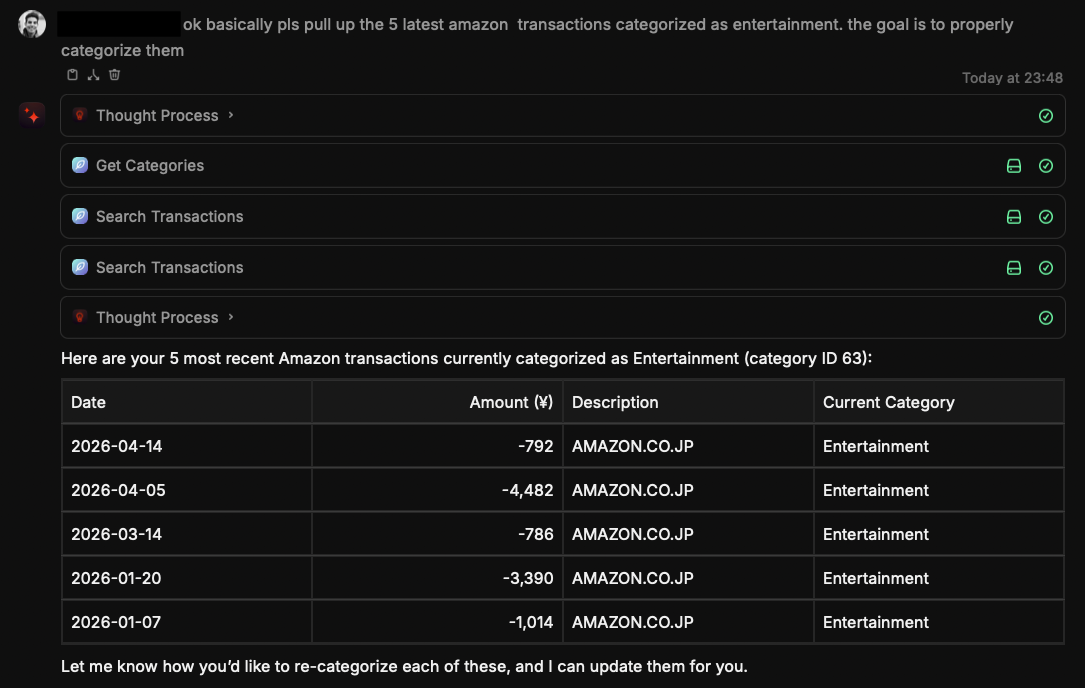
For the demo, it pulled the five most recent ones. In Moneytree, they all started from the same low-context transaction description: AMAZON.CO.JP.
The problem was obvious: the actual purchases belonged in different categories.
So I added the missing context:
- MacBook Stand
- iPhone Case
- Retainer Cleaner
- Snowboard Cover
- Razors
The agent suggested better categories.
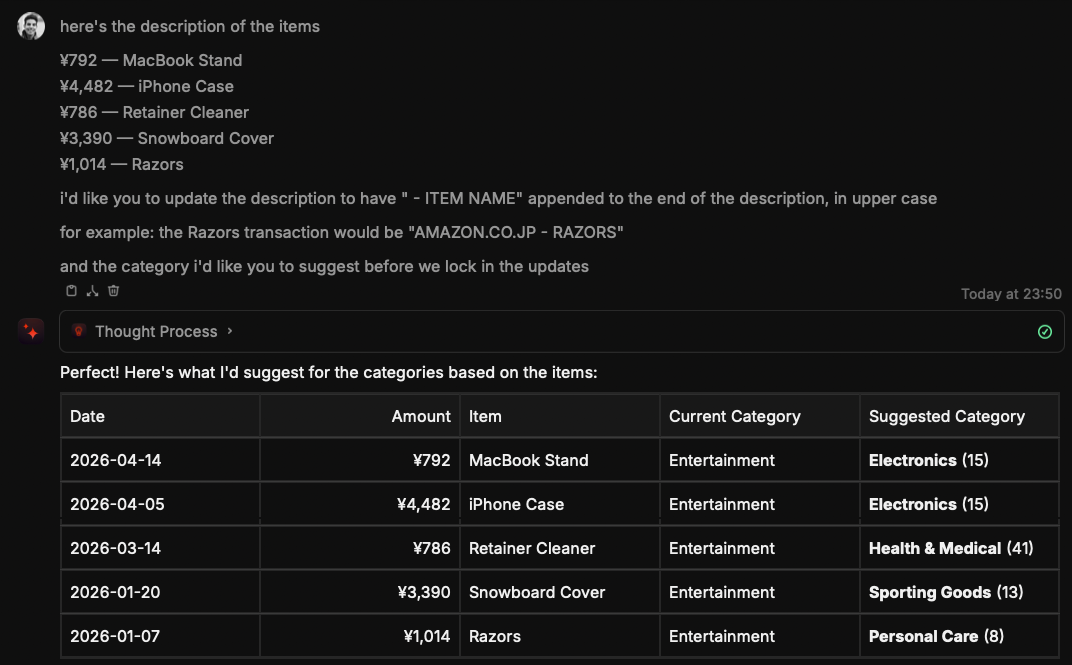
Most of the suggestions were good. I corrected two of them before applying the updates: the retainer cleaner should go under Dentist, and the snowboard cover should use my custom Snowboarding category.
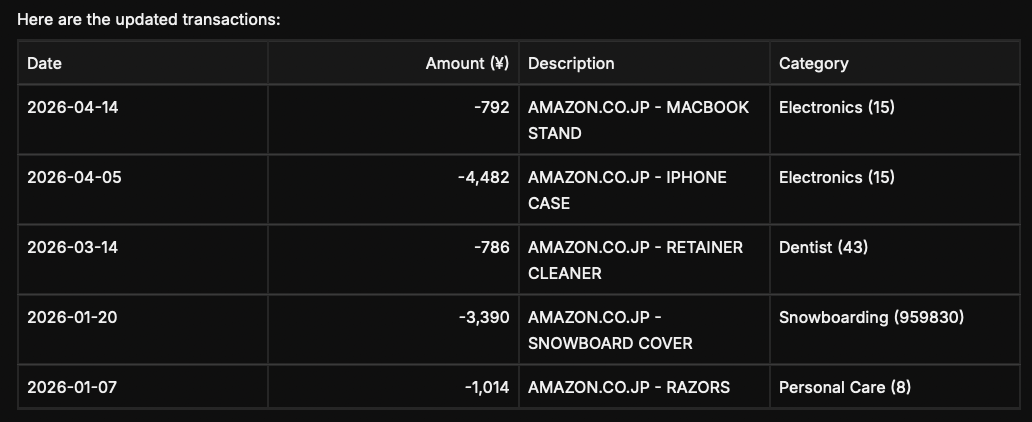
Then the agent updated the transactions.

The final result was not magic. It was better than magic: it was boring, explicit, reviewable maintenance. Or should I say “management”.
Here is the same flow as a sequence.
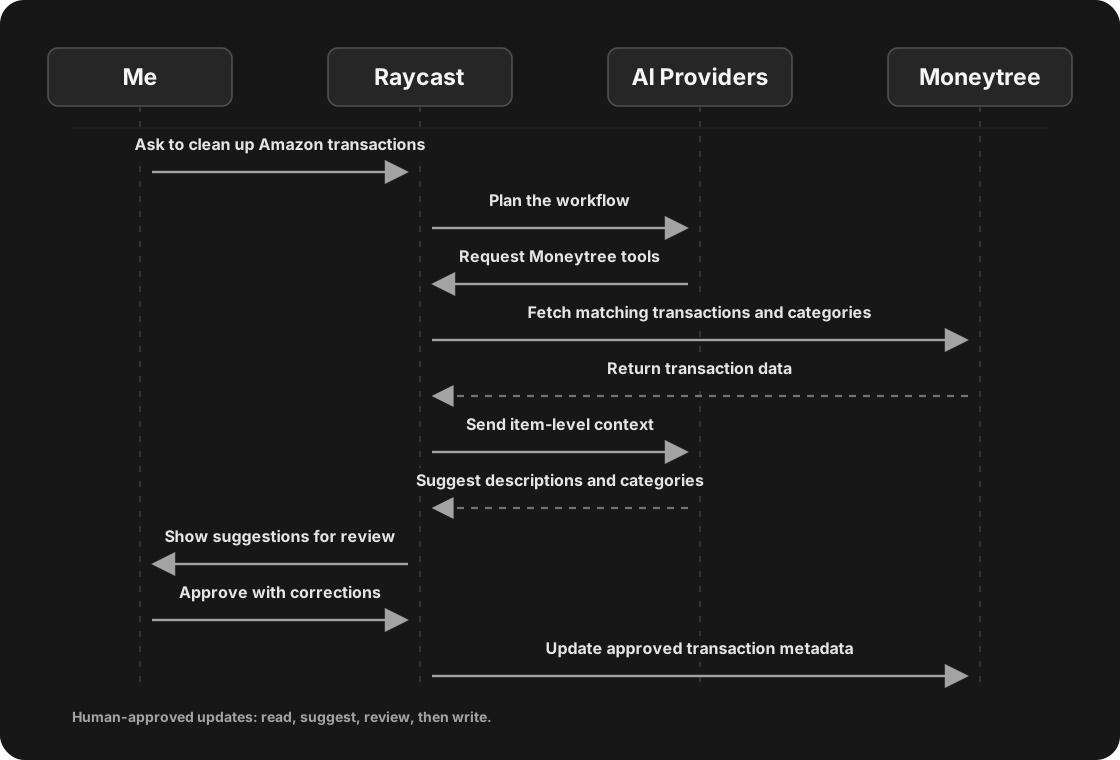
The important part is the loop:
- Search the financial data.
- Ask for or gather missing context.
- Suggest changes.
- Let the user correct them.
- Apply the approved updates.
That loop is where AI personal finance becomes much more useful. These workflows can become personal to each one of us: the categories we care about, the way we describe purchases, the rules we trust, and the context we are willing to connect.
If you live in Japan, use Moneytree, and use Raycast, you can try this today through the Moneytree Raycast extension. The extension is open source, so even if you are outside Japan, the code can be a reference for building similar workflows on top of local financial data aggregation services. The extension is also part of the Raycast extensions repository, where contributions can eventually make their way to the store.
Small Compounding Updates
The scope matters.
In this post, “management” means maintaining the data layer around your finances.
Changing a transaction description from AMAZON.CO.JP to AMAZON.CO.JP - RAZORS is the kind of small improvement that makes the rest of the app more useful.
Recategorizing five reviewed transactions is not flashy, but it compounds. Reports become clearer. Search becomes easier. Future questions get better answers.
The agent should not silently decide. It should prepare the work, show its reasoning, ask for confirmation, and then apply the changes.
Where This Goes Next
This post is focused on personal finance metadata, but the same pattern gets even more interesting for business expense tracking.
Moneytree already supports business-oriented workflows. An agent could eventually flag likely business expenses, suggest categories, attach context, or prepare a review queue instead of asking the user to inspect every transaction manually.
The agent does not need to be the final authority. In many cases, it should not be.
But it can remove a lot of manual sorting work before a human reviews the result.
That is the part I find useful.
AI-powered personal finance should not stop at better summaries. The next wave is not just asking better questions. It is keeping the data clean enough for the answers to matter.
Chatting with your finances is step one. Managing them, safely and explicitly, is the next step.
If you work on personal finance, open banking, AI agents, or productivity tools, I would love to hear what workflows you think should exist next.